Learn how to share a design, add collaborators (people and teams), and control who can view or edit it.
Prerequisites
You are the Owner or an Editor of the design. Viewers can't open the Share Design dialog.
Access the Share Design Dialog
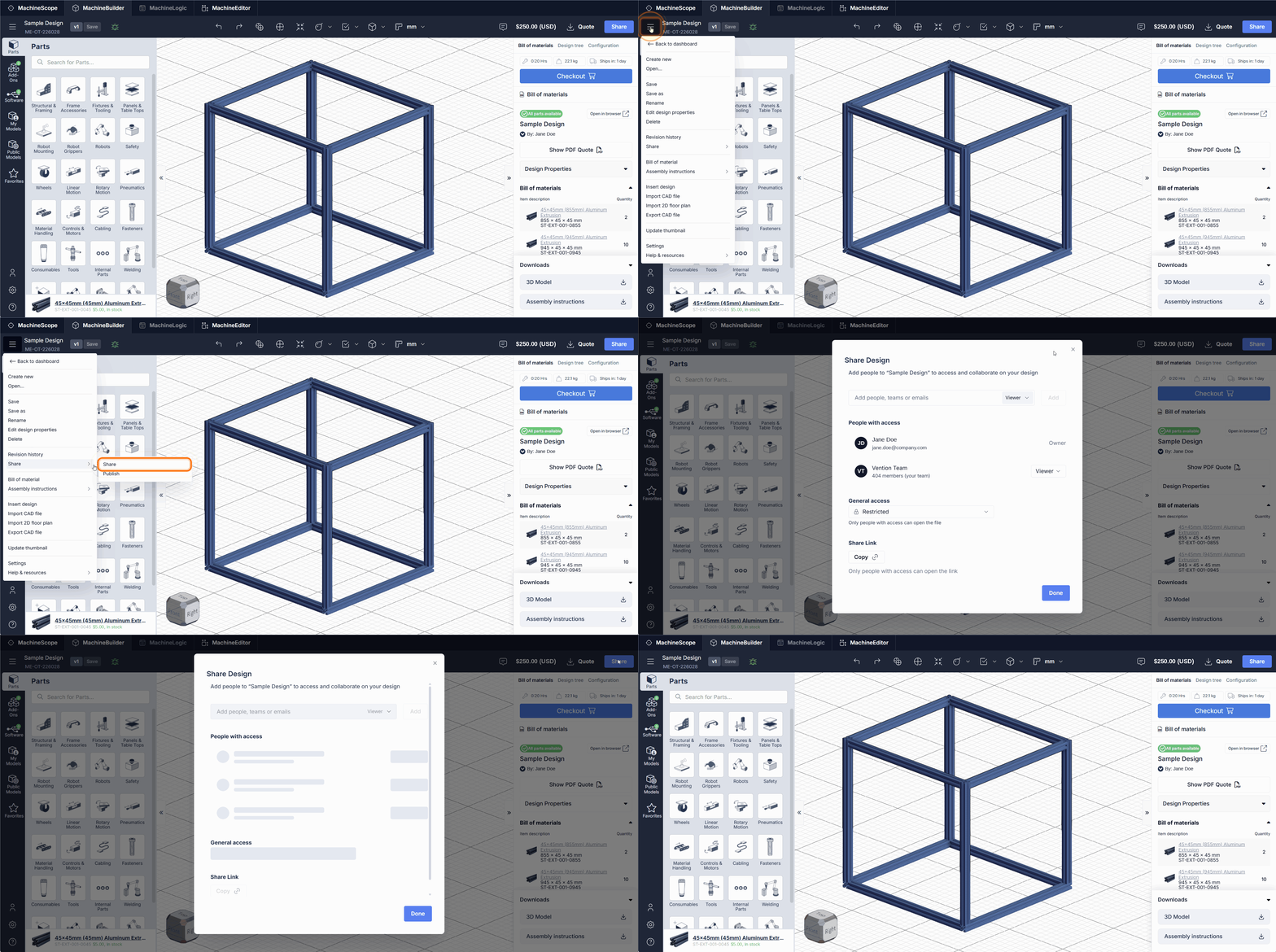
Share Design dialog is accessible via the main menu of MachineBuilder and the Share button in your toolbar:
Roles and Permissions
Action | Owner | Editor | Viewer |
|---|---|---|---|
View and copy the design | Yes | Yes | Yes |
Edit the design | Yes | Yes | No |
Manage access: add or remove people and teams, change roles and general access, and approve or deny access requests | Yes | Yes | No |
Transfer ownership | Yes | No | No |
Leave the design | No | Yes | No |
Each design has one Owner. Org Admins, the administrators of your organization, can also make someone the Owner and can add any team.
How Access Is Calculated
A person's access to a design is the highest level they get from three places: their own role, the role of any team they belong to, and the design's general access. A lower role never reduces access that comes from another place. For example, if a team is an Editor on a design and you also add one of its members as a Viewer, that member can still edit.
Add People and Teams
In the Share Design dialog, type a name or email address in the add field. Matching people and teams appear as you type. Teams are marked Team.
Select the person or team from the results. A role selector appears in the field. It defaults to Viewer.
If needed, change the role to Editor.
Click Add. Access is granted right away, and the person or team appears in the list.
Note: Select the person or team from the results before you click Add.
Good to Know
A team can't be the Owner. Everyone in a team gets the team's role, including people who join the team later.
Organization members can add only the teams they belong to. Org Admins can add any team.
You can add people who don't have a Vention account yet, but only by email. They show as Pending until they create an account. Pending only means the person hasn't created an account. It doesn't mean they are outside your organization.
Change a Role
In the Share Design dialog, open the menu on the row of the person or team.
Select Viewer or Editor.
You can't change your own role. To change the Owner, transfer ownership instead.
Transfer Ownership
Only the Owner or an Org Admin can transfer ownership.
In the Share Design dialog, open the menu on the row of the person who will become the Owner.
Select Make owner.
In the confirmation dialog, click Transfer ownership.
The previous Owner becomes an Editor and can no longer transfer ownership.
Remove a Person or Team
In the Share Design dialog, open the menu on the row of the person or team.
Select Remove.
In the confirmation dialog, click Remove.
Note: Removing someone only takes away their direct access. They keep any access they have through a team or general access. To remove all of someone's access, set general access to Restricted and make sure they aren't a member of a team that was added to the design.
Leave a Design
The Owner can't leave a design. Transfer ownership to someone else first.
In the Share Design dialog, open the menu on your own row.
Select Leave design.
In the confirmation dialog, click Leave design.
Warning: Leaving a design is permanent. You keep only the access you have through a team or general access.
Change General Access
In the Share Design dialog, go to the General access section.
Select an option: Restricted, Anyone at Org, or Anyone (Public).
For Anyone at Org, select the level: Can view or Can edit.
General access sets the minimum access for everyone it covers. People and teams in the list can have more access on top of it, but never less.
Option | Who has access |
|---|---|
Restricted | Only the people and teams in the list. There is no level selector. |
Anyone at Org | Everyone in your organization, at the level you select (view or edit). |
Anyone (Public) | Anyone with the link can view the design. Public access is always view-only. This option is unavailable until the design is published. |
Warning: Anyone (Public) lets anyone with the link view the design. Use it only for designs you are comfortable sharing publicly.
Teams aren't a general access option. To give a team access, add it to the list.
Publish a Design
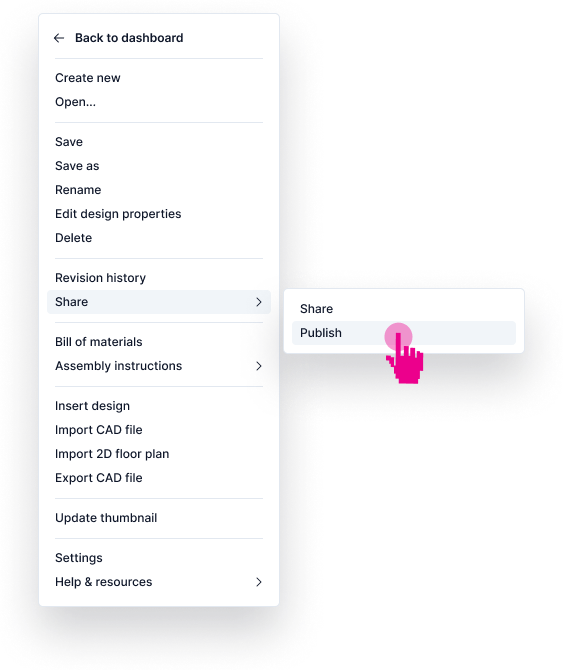
Publishing a design makes it public and anyone with the link is able to view the design and make copies of it.
Copy the Design Link
In the Share Design dialog, click Copy link.
Send the link to the people you want to open the design.
The link doesn't grant access by itself. What someone gets when they open it depends on their access:
Who opens the link | What they get |
|---|---|
Someone in the list, directly or through a team | Their role |
Anyone in your organization, when general access is Anyone at Org | View or edit access, as set in general access |
Anyone, when general access is Anyone (Public) | Read-only access |
Someone with no access | The request access page |
Approve or Deny Access Requests
If you need access to a design: When you open a design you don't have access to, you can request access from the request access page. You receive an email when the request is approved.
If you manage a design: Requests appear in the Share Design dialog. The Owner and Editors can approve or deny them.
In the Share Design dialog, find the access request.
Click Approve or Deny.
If you approve, select a permission level, Viewer (default) or Editor, and confirm.
Approved requesters receive an email. Denied requesters are not notified by email.